
Hypnospace Outlaw Brings Retro Internet Life to Mobile Players
Hypnospace Outlaw, the critically acclaimed late-1990s internet simulator, has officially transformed mobile screens into nostalgic gateways to the early Web.
Anúncios
Originally launched on desktop computers and home consoles, developer Jay Tholen’s cult favorite invites players to step into the boots of an Enforcer monitoring a fictional, sleep-assisted online universe.
Translating a dense, cursor-heavy desktop interface to modern touchscreen devices presents a massive design challenge, yet this mobile release delivers the full, uncompromised experience directly to your fingertips without sacrificing an ounce of retro charm.
This comprehensive review explores how the handheld port performs, why its tactile controls feel uniquely suited for touch interfaces, and how to navigate its sprawling web of authentic 1999-era web pages effectively.
Key Takeaways
Anúncios
- Direct touch controls replace the traditional desktop mouse cursor, making page navigation unexpectedly fluid.
- The entire overarching story, atmospheric soundtrack, and hidden easter eggs remain fully intact.
- Mobile-specific user interface refinements enhance readability and search precision across varied display sizes.
- Dedicated simulation enthusiasts gain an authentic digital time capsule of early internet culture on iOS and Android.

What Is Hypnospace Outlaw and How Does It Work on Mobile?
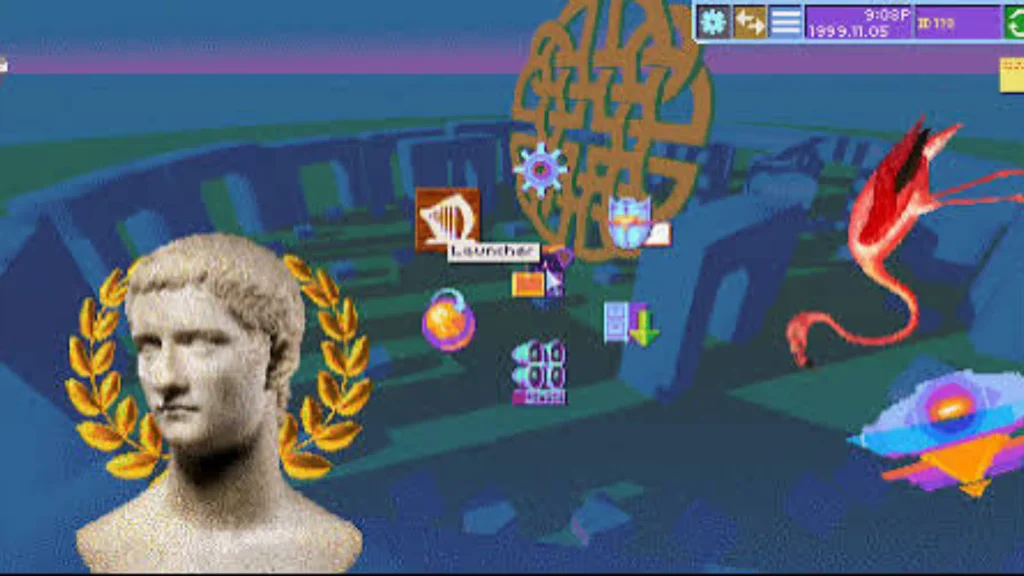
Hypnospace Outlaw operates as a detailed investigative puzzle adventure cleverly disguised as a vintage desktop operating system from 1999.
Players work directly for the Hypnospace Department of Page Enforcement, systematically scanning user-generated web pages for copyright violations, cyberbullying, malicious viruses, and illegal content.
Progressing through the main storyline requires inputting key terms into search bars, analyzing personal forum posts, and tracking down hidden digital clues embedded within custom MIDI music files and low-resolution animated GIFs.
On mobile devices, the development team meticulously adapted classical desktop cursor mechanics into a natural touch system.
Simple taps replace mouse clicks, while familiar pinch-to-zoom gestures allow player investigators to scrutinize microscopic text fonts and hidden clickable pixels.
Navigating across distinct community web zones feels remarkably responsive, retaining the deliberate, charming clunkiness of old dial-up connections while capitalizing on modern mobile processing power.
Why Does the Early Web Simulation Fit Touchscreens So Well?
Recreating a 1990s monitor environment on a pocket-sized smartphone screen might sound counterintuitive initially.
However, direct finger interaction actually heightens the sensation of operating a physical digital device.
Tapping directly on garish GeoCities-style banner ads and downloading questionable software files creates a personal connection that a traditional computer mouse cannot quite replicate.
Playing on a handheld device genuinely feels like holding a specialized futuristic diagnostic tool or an alternative-reality personal digital assistant.
Subtle adjustments to text rendering ensure that vintage pixel fonts stay crisp and readable even on vibrant, high-density OLED displays.
Furthermore, the retro sound design shines through wired or wireless headphones, deeply immersing players in period-accurate dial-up handshake sounds, soothing ambient synthesizer tracks, and low-bitrate MP3 recordings.
++ Idle Zoo Tycoon: Rescue Animals, Build Enclosures, and Attract Visitors
To better understand how the handheld adaptation holds up against traditional platforms, examine the hardware and feature comparison below:
| Feature or Performance Metric | Desktop Version (PC/Mac) | Console Port (Switch/Xbox/PS) | Mobile Port (iOS/Android) |
| Primary Input Method | Mouse & Keyboard | Gamepad / Analog Stick | Direct Touch & Touch Gestures |
| Interface Navigation | Classic Point-and-Click | Virtual Cursor / D-Pad | Tap, Swipe & Pinch-to-Zoom |
| Portability Level | Fixed Setup / Laptop | Semi-Portable / Hybrid | Completely Portable |
| Screen Real Estate | Large Monitor (1080p+) | Television / Handheld Screen | Compact High-DPI Display |
| Text Readability | Native Desktop Scaling | Fixed UI Interface Scaling | Dynamic UI Zoom Support |
Which Features Make the Mobile Gameplay Experience Stand Out?
Unraveling the deep digital mysteries of Hypnospace demands sharp critical thinking and patient investigation rather than lightning-fast reflexes.
Mobile players can effortlessly jump into quick fifteen-minute investigation sessions, flagging non-compliant web pages or bookmarking suspicious user profiles before putting their phone back into their pocket.
The application automatically saves player progress seamlessly, preventing lost investigation notes when switching between different daily smartphone apps.
Digital preservationists and gaming historians will thoroughly appreciate how accurately this game captures the chaotic energy of early online communities.
Detailed information regarding authentic software preservation efforts can be explored through the official Library of Congress Digital Preservation Program, highlighting precisely why archival digital experiences like this hold genuine cultural value.
Customizable Desktop Environments: Personalize your virtual operating system with nostalgic wallpapers, custom audio themes, and interactive desktop pets.
Integrated Music Player: Stream hours of incredible period-accurate original music through the built-in Hypnospace audio player software.
Deep Interconnected Narrative: Uncover rich human stories involving underground music movements, teenage angst, artistic feuds, and corporate overreach.
Virtual System Customization: Install simulated software updates, virtual anti-virus utilities, and custom browser themes to enhance your workflow.
++ My Supermarket Simulator: Manage Inventory and Grow a Successful Retail Business
How Does Hypnospace Outlaw Maintain Authenticity and Nostalgic Detail?
Authenticity remains the foundational cornerstone of Jay Tholen’s narrative vision. Rather than cynically mocking early web design tropes, the game treats its fictional netizens with immense empathy and historical nuance.
++ Happy Glass Puzzle Update Brings Creative New Mechanics
Every user-created home page tells an intimate personal story, reflecting genuine human expression from the dawn of the public internet boom.
The narrative’s portrayal of early content moderation challenges, copyright disputes, and evolving digital privacy concerns feels strikingly relevant today.
Understanding the historical context of technology policy offers valuable perspective for modern online safety debates.
Readers interested in broader internet history and digital rights frameworks can reference the Electronic Frontier Foundation, for detailed insights into how consumer advocacy and digital speech regulations have transformed over the decades.
Practical Next Steps for New Enforcers
Ready to boot up your virtual terminal, put on your headband, and start patrolling the cyberspace corridors? Follow these essential steps to maximize your investigation productivity right away:
- Download the Official App: Secure the game directly through the Apple App Store or Google Play Store for your smartphone.
- Wear Quality Headphones: Essential audio clues, hidden vocals, and embedded sound effects are vastly easier to distinguish in stereo.
- Keep Detailed Notes: Log suspicious account names, obscure passwords, and key terms in the integrated virtual notepad tool.
- Explore Every Web Page: Avoid rushing through primary assignment objectives, as the richest lore hides inside forgotten personal blogs and obscure fan pages.
Frequently Asked Questions
Is Hypnospace Outlaw on mobile the complete game experience?
Yes, this mobile release contains the absolute full narrative campaign, all web browsing zones, complete audio tracks, and post-game content found in the original desktop launch.
Do I need an active internet connection to play on mobile?
No, the entire simulated web environment is fully contained and stored locally on your mobile hardware, allowing complete offline gameplay wherever you go.
How do touch controls handle small interface elements?
Pinch-to-zoom functionality allows you to magnify any portion of the virtual display instantly, making small web links, tiny buttons, and fine text effortless to select.
Is this game enjoyable for players who did not experience the 1990s internet?
Absolutely. While retro nostalgia adds an entertaining layer of charm, the core experience relies on compelling storytelling, atmospheric exploration, and satisfying logic puzzles that appeal to any gamer.
++ Hypnospace Outlaw review: a surreal tribute to the 90s internet
++ Hypnospace Outlaw brings its beloved nostalgic ’90s internet sim experience to Android and iOS
Popular Now










